
Forex pairs
AI forex chart analysis for any pair, any session.
Bullynx reads a screenshot of your forex chart, EURUSD, GBPJPY or any pair from MT4, MT5, TradingView or cTrader, and writes back the trend, the support and resistance levels as prices, a bullish and a bearish scenario, and an invalidation you can turn into a stop in pips. Nothing connects to your broker.
Read my forex chart
Drop a screenshot of the pair below. It stays in your browser while you create your account, and Lynx reads it once you unlock the full analysis.
Drop your chart screenshot, or click to choose
PNG, JPEG or WebP, up to 5MB
Create your account and unlock the full read from $9.99. Lynx reads your chart once you pay.
Upload before signup · Educational only, not financial advice
What the AI forex chart analyzer returns
Every chart gets the same four parts in the same order, whether it is a major on the daily or a cross on M15. On a currency pair, the useful unit is distance: a level is a price, and the stop is the number of pips between the entry and the invalidation. The category overview, with the same read on stocks and crypto, is on AI chart analysis for trading.
- The trend, on the period you captured
- An H4 EURUSD chart and an M15 EURUSD chart answer different questions. The read describes the swing structure in the image, higher highs and higher lows, lower ones, or a range, and names the pair and period when they are on the chart.
- Levels as prices, to the pip
- Support and resistance come back as prices you can find on your own axis, to the fourth decimal on most pairs and the second on yen pairs, each marked strong, moderate or weak. A level quoted from a compressed axis is an estimate, so check it on your chart.
- Two weighted scenarios
- A bullish and a bearish case, each with the structure that would carry it and its own invalidation. Each carries a percentage; the two add up to 100 and neither goes above 90.
- An invalidation you can count in pips
- The setup gives an entry zone, a stop at the invalidation level and one or two targets, as prices. The distance between them, in pips, is the number your lot size depends on.
From the read to a stop in pips
The read quotes prices, because prices are what is on your axis. Your broker sizes in lots, and lots are sized from pips. Four rules cover the conversion:
- EURUSD, GBPUSD, AUDUSD and most pairs: one pip is 0.0001, the fourth decimal
- USDJPY, GBPJPY, EURJPY and other yen pairs: one pip is 0.01, the second decimal
- The extra digit most platforms show (the fifth decimal, or the third on yen pairs) is a pipette, a tenth of a pip
- Stop in pips = the distance between the entry and the stop, divided by the pip size
Add your broker spread to that distance on a tight intraday stop; the screenshot cannot see it. Then turn pips into money with the pip value calculator and into a position with the lot size calculator.
Example: a sample read on a real EURUSD H4 chart
The chart below is a real EURUSD 4-hour capture, taken September 14, 2026. The levels are a sample read written on it, the one the MetaTrader page plays as a film, and each of them is legible on the chart.
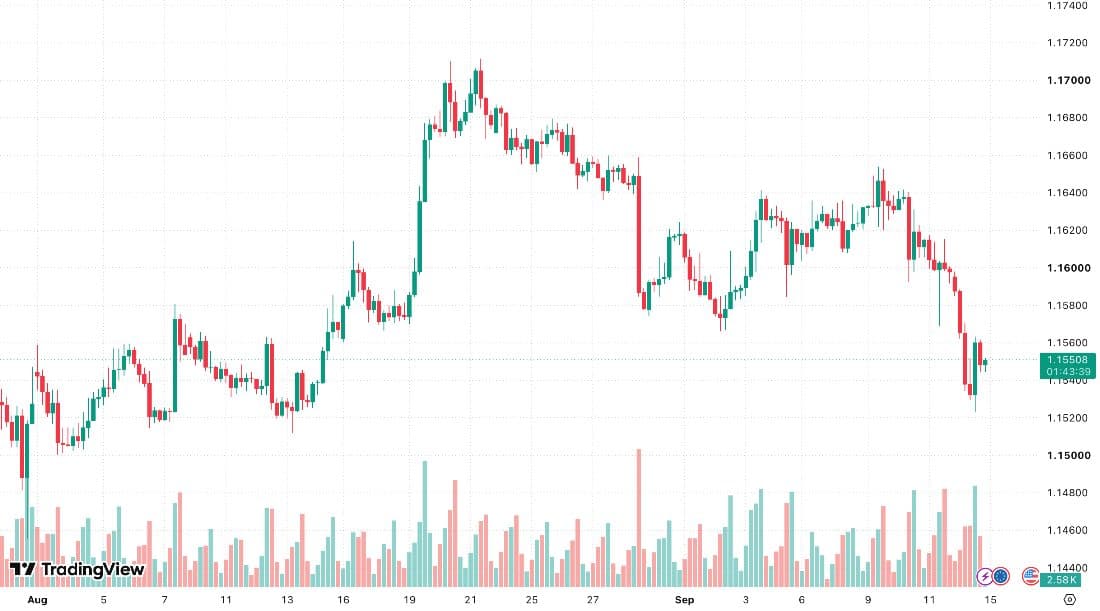
The bias is short with a conviction of 58 out of 100: a sequence of lower highs under the August top. The entry zone is 1.1600, the pivot price keeps returning to. The invalidation is 1.1640, the last lower high: a move back above it breaks the sequence the read rests on. The first target is 1.1520, the September 12 low. The bullish case, a reclaim of 1.1600, carries 42%.
In pips: 1.1640 minus 1.1600 is 40 pips of risk, and 1.1600 minus 1.1520 is 80 pips to the first target, two to one before the spread. Those two numbers, not the bias, are what decide whether the idea is worth the room it needs. How this chart was exported from MetaTrader is on analyze MT4 and MT5 charts with AI.
London, New York and Tokyo sessions on your chart
The forex week runs from Sunday evening to Friday evening, US Eastern Time, and the same pair behaves differently in each session. Approximate hours while the US is on daylight time; they shift by an hour when the US or the UK changes its clocks, on different dates, and Japan does not change at all.
- Tokyo, about 7 p.m. to 4 a.m. ET
- Usually the quietest hours for EURUSD and GBPUSD, while yen and Australian dollar pairs see more of their own flow. The range built here is often the reference the London open breaks.
- London, about 3 a.m. to noon ET
- The largest share of forex volume trades in London. The London open is where a quiet Asian range most often turns directional, especially on euro and pound pairs.
- New York, about 8 a.m. to 5 p.m. ET
- US data releases land early in the session, and the overlap with London, roughly 8 a.m. to noon ET, is usually the most active window of the day. Liquidity thins after the London close.
Make the session visible. A legible time axis and the timezone in the note are enough; a session box drawn on the chart is better. Without either, the read sees candles, not clock times, and cannot tell a London breakout from an Asian drift.
MT4, MT5, TradingView and cTrader screenshots
The read works on an image, so any platform works, and Bullynx never connects to one. Four capture notes:
- MT4 and MT5
- File, then Save As Picture, exports the chart window without the terminal around it. The time axis shows broker server time, which is often UTC+2 or UTC+3 rather than your clock, so say which in the note.
- TradingView
- The snapshot button saves the chart with its legend. Keep the broker or feed prefix in the legend (OANDA:, FX:) and the price axis on the right; a session indicator, if you use one, belongs in the capture too.
- cTrader
- Capture the chart area with your system screenshot tool, symbol and period label included. Turn the order and position panels off first: they take pixels from the candles and add nothing to the read.
- Broker apps on a phone
- Switch to candles, rotate to landscape so more bars fit, and keep the pair and period in the crop. The read works on the picture, so any app that draws the chart works.
Platform guides: analyze TradingView screenshots with AI, and for the step-by-step forex basics, how to read forex charts.
EURUSD and GBPJPY: two pairs, two different charts
The read is the same discipline on every pair. What changes is the pip, the range and the news that moves it:
- EURUSD
- The most traded pair. Its levels are quoted to the fourth decimal, it reacts to ECB and Fed expectations that are not in the image, and its day is shaped by London and New York.
- GBPJPY
- A yen cross: the pip is the second decimal, and the daily range in pips is usually several times wider than EURUSD. The same lot size on the same-looking chart carries a very different risk.
- XAUUSD on a forex platform
- Gold sits next to the pairs in MT4 and MT5, but its pip convention varies by broker and its invalidation usually needs more room. It has its own page below.
Pair walkthroughs: EURUSD chart analysis, GBPUSD chart analysis, and for gold, AI gold chart analysis.
What it cannot see on a forex chart
Six limits, stated plainly. Currency prices move on rate expectations, and a chart only shows what those expectations have already done to price.
- See rate expectations, central bank guidance or the economic calendar. They move pairs, and none of them is in a candlestick chart
- Know your broker spread, commission or swap, which matter on a tight intraday stop
- Tell tick volume from real volume: on a retail forex chart the volume bars count price changes, not traded size
- Know which session it is looking at unless the time axis is legible and you name the timezone
- Connect to MetaTrader, cTrader or any broker, see your positions, or place an order
- Tell you whether to enter. You get a bias, two scenarios and an invalidation level, not a signal
What AI forex chart analysis costs
Bullynx sells three things, and there is no free plan. One analysis is $9.99, a one-time payment for the full read of one chart, without Lynx chat. Monthly is $39 a month for 50 chart analyses a month and Lynx chat, cancel anytime. Lifetime is $149 once for the same limits for life, 50 chart analyses every month and Lynx chat, with no subscription.
Monthly comes with a 14-day money-back guarantee on your first non-zero subscription charge. One analysis and Lifetime are one-time purchases and are final. How the forex AI tools on the market compare, Bullynx included, is in best AI for forex trading; what each plan includes is on Bullynx pricing.
Frequently asked questions
- Can AI analyze forex charts?
- Yes, from a screenshot. Capture the chart with the pair, the period and the price axis visible, upload the image, and the read returns the trend on that period, the key levels as prices, a bullish and a bearish scenario, and the invalidation point. It works on majors, crosses and exotics from any platform.
- Is Bullynx a free forex chart analyzer?
- No. Bullynx has no free plan and no free trial: you upload the chart, pay, and the read runs on it. One analysis is $9.99, a one-time payment for the full read of one chart, without Lynx chat. Monthly is $39 a month for 50 chart analyses a month and Lynx chat, cancel anytime. Lifetime is $149 once for the same limits for life, 50 chart analyses every month and Lynx chat, with no subscription.
- Does the read give the stop loss in pips?
- It gives the stop as a price, at the invalidation level, along with the entry zone and the targets. Converting that into pips is one subtraction: on EURUSD a stop 0.0040 from the entry is 40 pips, on GBPJPY a stop 0.40 away is 40 pips. The pip value and lot size calculators turn those pips into money.
- Does it work with MT4, MT5, TradingView and cTrader?
- Yes. The read works on an image, so it does not matter which platform drew it. Bullynx never connects to MetaTrader, cTrader or a broker account: export or screenshot the chart, keep the pair and the price axis in frame, and upload it.
- Does it know which session my chart shows?
- Only if the image says so. A chart shows candles, not clock times, unless the time axis is legible, and MetaTrader prints broker server time. Add a short note with the upload, such as "times are UTC+3, London open at the shaded box", and the read uses it.
- Is there an AI forex analysis app?
- Not from Bullynx: there is no App Store or Google Play app. It runs in the browser on desktop and on phones, so you can screenshot the chart in MT4, MT5 or your broker app on the phone and upload it from the same device.
· Educational only. Not financial advice.
Screenshot the pair. Count the pips.
Upload before signup. Create your account, unlock at checkout, and the read runs on the chart you already added.
Upload my chartEducational only. Not financial advice. Read the risk disclosure.